Prompt caching: why agents cost more to run in Switzerland
AI agents send a lot of text to the model at every step, often the same text as in the step before. How much lower the rate for this repeated text is differs widely between providers. The article works through an example of what these differences mean for costs at Swiss and foreign hosts.
Analysis · Published 6 Oct 2026 · Updated 21 Oct 2026 · Joel Barmettler
Why an AI agent rereads everything at every step
In our worked example, the same AI agent costs 17 times as much at the Swiss host Phoeniqs as at DeepSeek V4 Flash, although new input costs almost the same. DeepSeek bills repeated text at 2 percent of the input price (prompt caching); Phoeniqs lists no price for it (price list of 1 October 2026) and bills it in full.
This is the second part of our series on buying inference. The first part showed why the price per token says little about the bill. This part works through the biggest lever.
What inference is and what matters to the host
Training a language model takes months and costs millions. After that, everyday operation begins. Every question to ChatGPT, every call from a coding assistant and every answer from an internal chatbot is inference, the use of the finished model. Customers pay for it per token, with input and output billed separately.
Most companies buy inference from a large US provider, directly from OpenAI, Anthropic or Google or through their clouds, Azure and AWS. Alongside them, an industry has emerged that runs open models and sells access through an API. Fireworks and Together AI are based in the US; Infomaniak, Phoeniqs and Swisscom in Switzerland.
In this article, the customer is whoever uses a language model through an API and pays per token, which usually means you, the reader. A host is the company that runs the servers and the model. Where we mean a company in general, such as DeepSeek or Anthropic selling its own model, we say provider. The customer can only choose whom to pay, and sees what the host bills only on the invoice.
Hosts do not train models. They download open models such as Apertus or Qwen and run them on servers with graphics cards (GPUs). Infomaniak’s price list for rented machines gives a benchmark of what such a server is worth. A server with one Nvidia A100 (instance type nva100_sxm180g_a128_ram240_disk0) costs 1,057.91 francs a month, about 1.45 francs an hour.[1] Suppose a host bundles eight of them to run a model such as Apertus. Then about 12 francs an hour are at stake, which is what the same eight servers would earn if the host simply rented them out as bare hardware.
If the host instead runs a model and bills per token, it must on average earn more than those 12 francs an hour. To set the price it needs three figures. How many tokens does the server process per hour? How many of them are input and how many output? And how well is the server utilised? The price per million tokens follows from these.
A worked example shows the order of magnitude. For Apertus 1.5 70B, Phoeniqs charges 2.2201 francs per million output tokens and 0.6195 francs per million input tokens (price list of 1 October 2026).[2] To cover the 12 francs an hour alone, eight A100s would have to deliver about 5.4 million output tokens every hour, roughly 1,500 tokens per second. With input tokens alone it would be about 19 million per hour, roughly 5,400 per second. The example assumes eight A100s. How Phoeniqs actually runs its model is not public.
A host earns only what exceeds this hourly cost. It must therefore get as many tokens as possible out of the same machine every hour. Competition is fierce. Infomaniak, Swisscom and Phoeniqs all offer Apertus, and in our assessment switching between them costs very little, because the APIs are largely the same. There are two levers for this, which we explain in turn: batching and caching.
Every answer has two phases
A request runs in two phases that have little in common technically. First comes the prefill. The model reads the entire input in a single pass. That is a lot of computing work, but it parallelises well, and graphics cards are built for exactly that. Then the decode begins. The model writes the answer token by token, and each token depends on the one before. Within a single request, the card cannot parallelise anything.
Think of a case file and dictation. You can skim a case file quickly because you see many pages at once. Dictation goes word by word.
For the graphics card to write the answer, it must not only read the input but also keep it. The result of the prefill sits in the KV cache, an area in GPU memory. The longer the input, the more space it takes up. The following graphic shows what happens on the server when users send requests. First, the building blocks:
- Users stand at the bottom and carry a letter. A user can be a person in a chat or an agent. A user appears only while waiting for an answer. In the first example there is only user A, in red.
- A request is the coloured box. It contains everything the user sends to the model: the history so far and the new message. The height of the box stands for the length of this input.
- An answer is made of circles. Each circle is one token that the graphics card writes.
The request travels through three stations on the server:
- Queue. The request moves to the top left and waits until there is space in memory.
- KV cache. It moves into the graphics card’s memory, which is ten units high. There the input is read, and the request fills with colour as it goes. This is the prefill.
- Decode. Then the graphics card writes the answer to the right of it, one circle per second. In this example there are five circles. When they are done, they flow back to the user, and the request leaves memory.
User A asks the model four questions in a row. The model remembers nothing. With every new request, the whole conversation so far is therefore sent again, otherwise “And for Austria?” could not be answered. The request grows by two units in every round, because the last answer and the new question are added. The server reads it from the start each time. With an agent, tool descriptions, project rules and files are added, but the principle stays the same. Play the graphic and watch how long it takes until the first circle appears:
The wait grows from round to round even though the answer is always the same length. The reason is the prefill: every round first reads the whole, ever longer history. Only the last piece of each input is new.
Batching: why many users use the card better
During decode, the graphics card must fetch all of the model’s weights from its memory for every token, that is, the billions of numerical values the model has learned. The computation is quick; the wait for memory is long. One read, however, is enough for many requests at once: the card fetches the weights once and writes one token for every running request. If it serves a hundred users at the same time, one read serves all hundred. The requests are bundled like a batch of jobs that is finished in one pass, which is called batching. Modern servers keep adding new requests to the batch and dropping finished ones.
The more requests are in the batch, the more tokens the card produces per second, because every running request delivers one token at every step. A full card works efficiently, a half-empty one wastes capacity. The limit is set by memory: every running request needs space there for its text. Many short requests or a few long ones fill it equally fast. The free space decides how many requests run at the same time, and with that, how well the card is utilised.
Batching has a cost, too. If a request waits until space becomes free, the user sees the first word later (time to first token, the wait until the first word of the answer).
The same graphic with five users shows what this looks like. The decode writes at most three answers at the same time (in reality it is far more; here the number stays small so that it stays visible), and the prefill reads only one request at a time. Two limits apply. If a request no longer fits into memory, it waits in the queue until another has finished. With five users, up to three requests can pile up there. If more than three requests fit in, the card still writes only three answers at a time, and the rest wait in memory for a free slot.
When memory is full, the wait until the first circle rises. Every input must first be read, and the prefill reads only one request at a time.
What prompt caching is and what it saves
The graphic above shows the waste: in round 2, the server reads text that it already read once in round 1. The start of both inputs is identical token for token, and only the end is new. A caseworker who rereads the whole file from the start before every phone call and takes no notes works in the same way.
Prompt caching saves exactly this repetition. After the answer, the provider leaves the request it has read in the KV cache instead of discarding it. If the next request begins with the same tokens (the start of the request, the prefix), the provider takes that part from the cache and computes only the new remainder. That is a cache hit. How long the provider keeps the prefix is called the retention time. The prefix must match token for token. That is why the technique is also called prefix caching in technical usage. Even a timestamp at the very front produces a different prefix, and the cache misses.
The same session once more, now with a cache. Switch between the variants. With a cache, the request stays in memory after the answer, with a dotted border. In the next round, the graphics card reuses the hatched part and reads only the new units:
Without a cache, the wait grows from 4 to 10 seconds. With a cache, it stays at 4 seconds, because only the two new units are read, the last answer and the new question. This holds as long as the request stays in memory. The next section covers how long that lasts.
A long coding session shows how much this matters. In every round, 9,000 tokens of input are added, such as tool results, files and instructions, and the model writes 1,000 tokens of answer. In the next round the answer belongs to the history, so the context grows by 10,000 tokens per round. Of this, the provider has to read anew only the 9,000 tokens of input, because it already processed the answer while writing it. The first graphic shows the first five rounds: the entire input and the part of it that the provider reads from the cache as long as the cache survives.
Coding session with the cache intact
- Request 1 9,000 full price
- Request 2 9,000 full price
- Request 3 9,000 full price
- Request 4 9,000 full price
- Request 5 9,000 full price
Processed at full price: 45,000 of 145,000 tokens (31 %)
Over these five rounds the input adds up to 145,000 tokens, of which the provider has to compute only 45,000 anew. If the cache is lost after round 2, for example because the agent is waiting for a test or an approval, the same session looks like this:
Same session, cache expired after round 2
- Request 1 9,000 full price
- Request 2 9,000 full price
- Request 3 29,000 full pricePause longer than the retention time: everything recomputed
- Request 4 9,000 full price
- Request 5 9,000 full price
Processed at full price: 65,000 of 145,000 tokens (45 %)
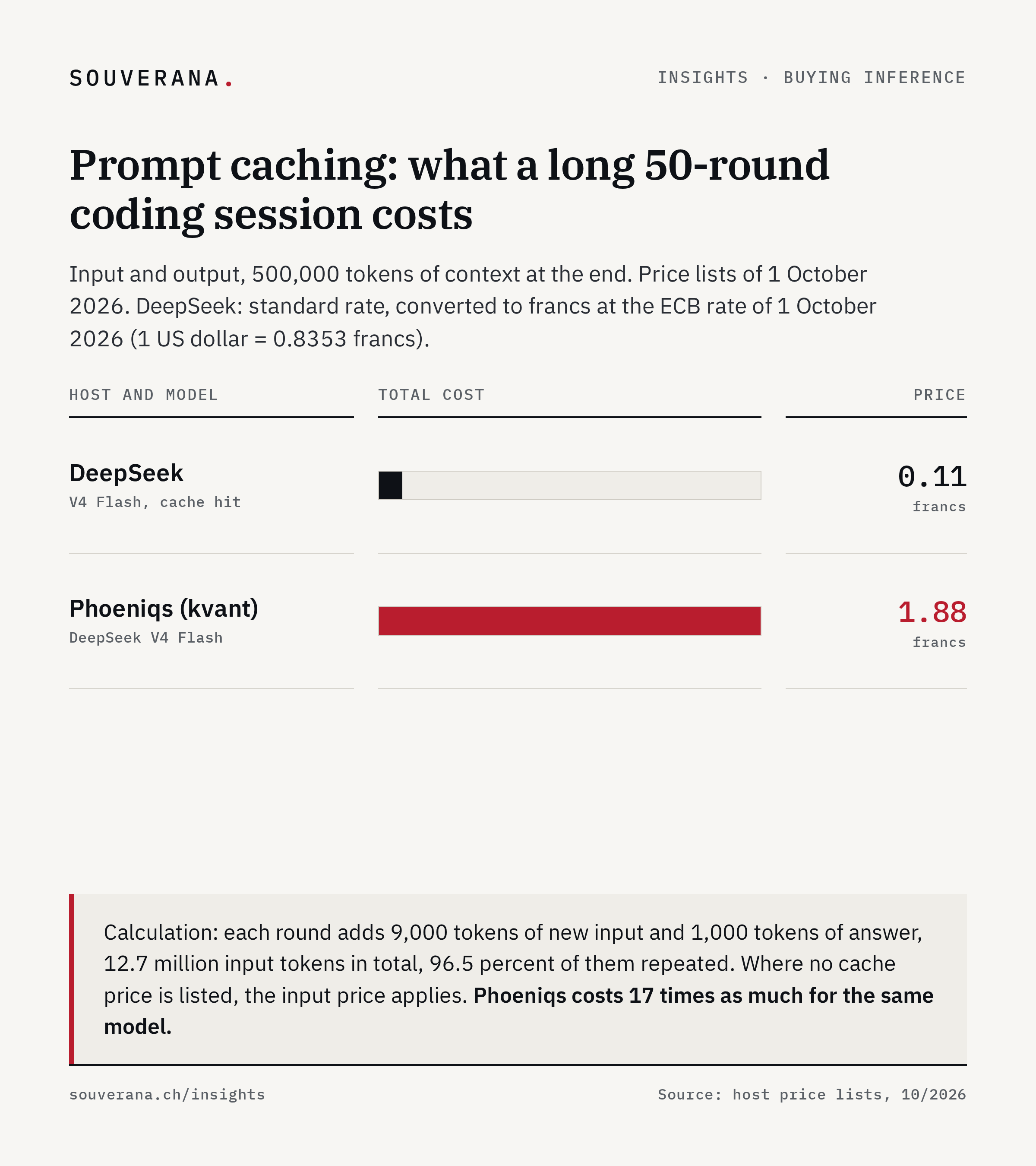
A single cache loss raises the cost of the five rounds by almost half. The provider must now bill 65,000 tokens at the full price, against 45,000 before. Over 50 rounds the context grows to 500,000 tokens. The session then processes 12,700,000 input tokens in total. With a cache that stays alive throughout, only 450,000 of them are billed at the full price, which is 3.5 per cent. In addition there are 50,000 output tokens.
The table shows what the session costs in total. It is based on the price lists of 1 October 2026.[2, 3] DeepSeek is converted into francs at the European Central Bank rate of 1 October 2026 (1 US dollar = 0.8353 francs)[4]:
| Provider and model | Input | Output | Total |
|---|---|---|---|
| DeepSeek V4 Flash, with cache | 0.087 francs | 0.025 francs | 0.112 francs |
| Phoeniqs, DeepSeek V4 Flash | 1.857 francs | 0.020 francs | 1.876 francs |
We calculate with DeepSeek’s standard rate because it applies for almost 80 per cent of the week’s hours. At peak times (Monday to Friday, seven hours a day), DeepSeek doubles all prices, and the gap then narrows by half, to about 8 times.[3] For a chatbot that gets a fresh context with every request, the gap would hardly be noticeable.
For confidential data, we do not recommend the DeepSeek API. In this article it serves only as a price reference.
The gap in bar form:
Total cost of a 50-round coding session
- DeepSeek V4 Flash, with cache0.11 francs
- Phoeniqs DeepSeek V4 Flash1.88 francs
Anthropic also offers prompt caching, with a different pricing model. For most models, a cache hit costs one tenth of the input price there. Writing to the cache, that is, the first processing of a new prefix, costs 1.25 times the input price at the standard retention time (TTL) of five minutes. At DeepSeek, writing costs nothing.[3, 5]
Why the cache is not always there
Whether a cache works is decided by the host. The customer sends requests and sees on the invoice what comes out. For the host, switching it on is easy: the common server software ships with prefix caching, and on a single machine it works. In our own measurement with Apertus-8B, 8,000 tokens of shared context and eight users, the wait fell from 17.9 to 0.9 seconds, with a hit rate of 76.7 per cent. In that test all eight users ask at the same moment, and the cache stays warm.
An agent pauses between steps. Between two steps a test runs, an approval is pending or a human is typing. When space runs short, the server software first deletes the entry that has gone unused the longest. Every new customer needs space. On a busy server, an agent’s cache can therefore be evicted by other customers’ conversations during a pause of a few minutes. We have not measured this. How long a host keeps a text is its own decision. Anthropic sets five minutes as the standard retention time and charges a premium for a retention time of one hour. Retention costs money.
A host that wants to keep texts longer moves the cache out of expensive GPU memory into larger and slower storage, for example the server’s main memory (RAM). This is called offloading. The next graphic replays it with five users who pause briefly between rounds. If the cache lives only in GPU memory, every request evicts another user’s before that user returns. The model therefore shows no hit at all, and the waits are as long as without a cache. Switch to “Cache with RAM”. Evicted entries then move into the server’s much larger RAM, which sits above the KV cache in the graphic, and come back in the next round. Fetching them back costs one second of copying time in the model and replaces rereading.
How a host sets this up technically, and what it must ensure besides memory, we describe in the article Prompt caching in operation.
What this means for procurement
We checked Phoeniqs’s price list on 1 October 2026, and it shows no cache price; neither does Infomaniak’s.[1, 2] We did not evaluate Swisscom or the other hosts that offer Apertus. Our worked example uses Phoeniqs because it runs the same model as DeepSeek, so the comparison is limited to the cache price. Where a price list shows no cache price, we bill repeated input at the regular input price.
Anyone deploying agents should clarify four things before choosing a host: whether the start of a request is cached, what a hit costs, how long the entry lasts, and whether the response reports per request how many tokens were hits. The questions are set out as a worksheet in the PDF of this article. You can check whether the answers hold up with the following test.
How to measure it yourself
You can find out within a few minutes whether a provider caches: send the same request twice and read in the usage field of the response how many tokens counted as hits. At DeepSeek the field is called prompt_cache_hit_tokens; on OpenAI-compatible APIs it is often cached_tokens. You can see the retention time by repeating the request after pauses of 5 and 30 minutes. All you need is API access, but the API must report hits in usage.
The procedure in four steps:
- 01
Prepare a long request
Write a fixed prefix of at least 5,000 tokens, such as a manual or a system prompt, and put the question at the very end. Nothing at the start may change, not even a timestamp.
- 02
Send twice, measure time
Send the same request twice in a row. For both, note the time to first token and the value in the usage field.
- 03
Add pauses
Repeat the test after 5 and after 30 minutes. This shows how long the cache lasts and whether it is still there on a busy server.
- 04
Check the invoice
If the field reports hits but the invoice shows no saving, you pay the full price for work the provider never did.
This tells you whether your provider caches, how long the cache lasts and whether the provider passes the benefit on. The same measurement is worthwhile on your own server.
Sources
Frequently asked questions
- What is prompt caching?
- The provider keeps the computed results for the input so far in the KV cache, a temporary store. If the next request starts with the same pieces of text (tokens), it computes only the new remainder. That saves computing time. It saves money only where the provider passes the benefit on, for example DeepSeek with V4 Flash at 2 percent of the input price (as of 1 October 2026).
- Why does prompt caching matter so much for agents?
- An agent resends tool descriptions, rules and history at every step. In our worked example (a coding session, 50 rounds of 9,000 tokens of new input each), 96.5 percent of the input is repetition. With a cache, the session costs 0.11 francs at DeepSeek V4 Flash and 1.88 francs at Phoeniqs, which lists no cache price (price lists of 1 October 2026, DeepSeek converted at the ECB rate of 1 October 2026, 1 US dollar = 0.8353 francs).
- Do Swiss hosts offer prompt caching?
- Among the Swiss hosts we checked, Phoeniqs (kvant) lists only one input price in its price list of 1 October 2026, and Infomaniak lists no cache price either. We therefore bill repeated input at the full price, at Phoeniqs about 0.1462 francs per million tokens for DeepSeek V4 Flash. Ask in writing for the price of cache hits and the retention time, or check it with the test in this article.
Share this article
Ready-formatted graphics and a suggested post for your LinkedIn feed: download, copy, post.
Suggested post
Do you run AI agents that resend the same long context at every step? Then at Phoeniqs you pay the full input price every time, because its price list of 1 October 2026 shows no price for repeated input.

DeepSeek V4 Flash bills input that the provider reads from its temporary store (a cache hit) at 0.0025 francs per million tokens, against 0.125 without a hit (off-peak rate, converted at the ECB rate of 1 October 2026).

Our worked example is a long coding session of 50 rounds: 9,000 tokens of new input each, 1,000 tokens of answer, 500,000 tokens of context at the end. At DeepSeek it costs 0.11 francs. Phoeniqs runs the same model and bills repetition in full. The same session costs 1.88 francs there, about 17 times as much.

Our conclusion: for agents, the cache price belongs next to the list price in every provider comparison.

In the article: how a model reads the input (prefill), writes the answer (decode) and serves many users at once (batching), how prompt caching saves the repetition, why an agent's cache gets evicted during pauses, and a test that lets you check your provider in under an hour. Link in the comments.

#AI #LLM #Inference #Switzerland #PromptCaching