Ollama, llama.cpp or vLLM: choosing the right engine
Ollama, llama.cpp or vLLM: the choice depends on two questions. How many people work on the model at the same time, and how much graphics memory do you have relative to the model you want? Three tools, measured on the same hardware.
Technical · Published 14 Aug 2026 · Updated 1 Oct 2026 · Joel Barmettler
Ollama, llama.cpp or vLLM: which engine do I need?
Ollama, llama.cpp and vLLM are programs that serve an AI model on your own hardware. The choice depends on two questions: how many people work on it at the same time, and does the model fit entirely into graphics memory? One person is most comfortable with Ollama, tight memory or a team calls for llama.cpp, many users and ample memory for vLLM.
In brief
- Ollama processes requests one after another. In our measurement with four concurrent users, the fourth waited 62 seconds for the first character of the answer. llama.cpp served the same four users, with the same model file on the same graphics card, after 8 seconds.
- For a single person, Ollama is the most comfortable choice. It installs in minutes, and the first answer arrived after 0.9 seconds.
- Anyone who wants to run the largest possible model on small hardware uses llama.cpp. Only there can the experts of an MoE model be offloaded to system memory (Mixture of Experts: a model made of many sub-networks, the experts, of which only a few compute per token).
- vLLM pays off with many concurrent users and a model that fits comfortably into graphics memory. At eight users it delivered 240 tokens per second, llama.cpp 165.
- SGLang is another engine, specialised in requests with shared context. Our hybrid model (it mixes two kinds of layers) would not start on it. So before choosing vLLM or SGLang, check whether your model is supported.
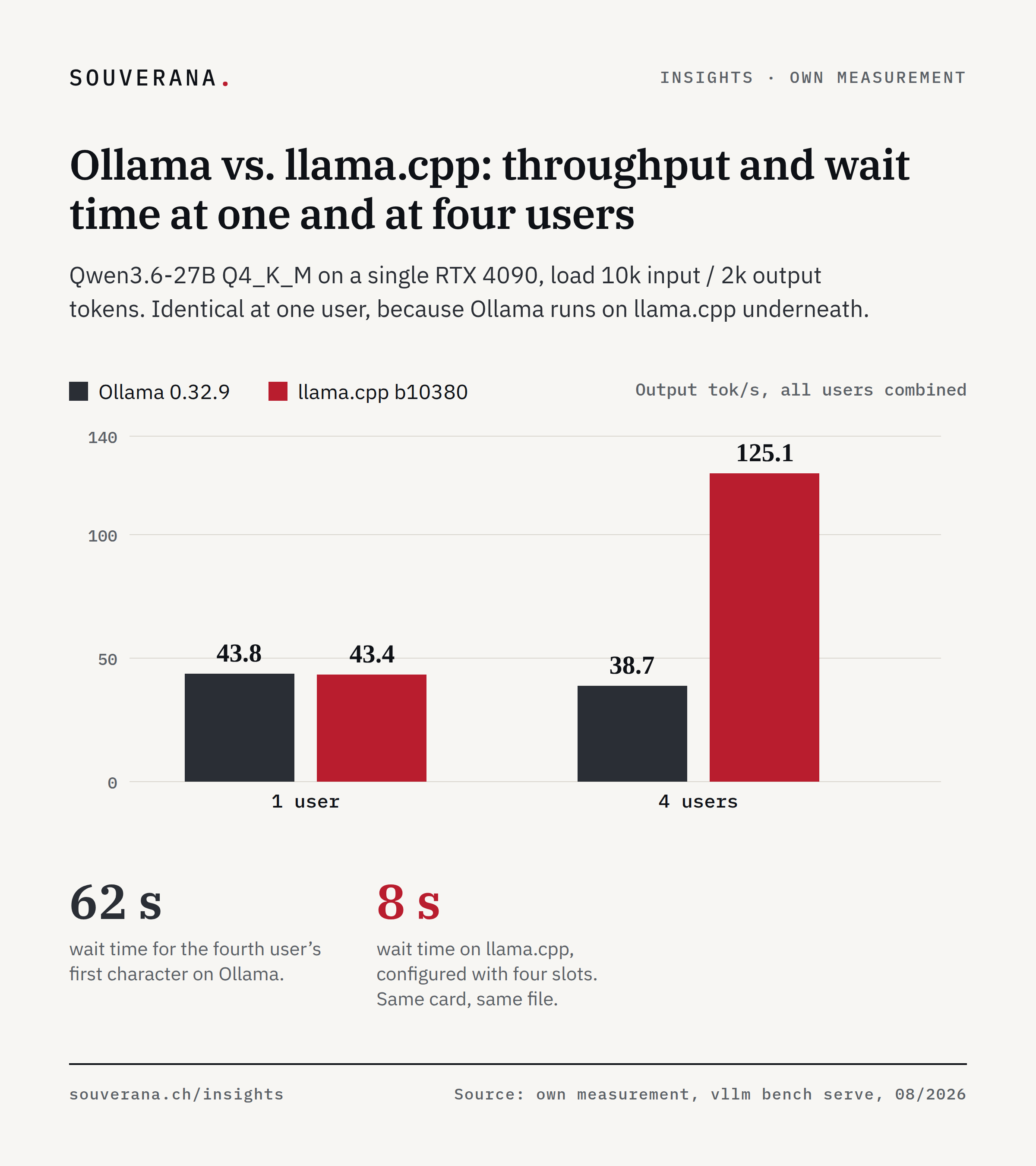
Two measurements come first. Same model file, same graphics card (an RTX 4090), one user: Ollama delivers 43.8 tokens per second (a token is a chunk of text a few characters long), llama.cpp 43.4. Practically identical. Same file, same card, four users: Ollama falls to 38.7, llama.cpp rises to 125.1.
These two measurements show the first axis of the choice: the number of concurrent users. The second axis is your graphics memory relative to the model you want. On it, the two large engines face off. vLLM is built for machines whose graphics memory comfortably fits the model, and turns the remaining graphics memory into throughput. llama.cpp is built for the reverse case and extracts the largest possible model from tight graphics memory.
The engine, in this context, is the software that loads a model, accepts requests and keeps the graphics card busy. It has no influence on how clever the answers are. We measured three tools on the same hardware, plus one specialist that never made it to the measurement stage.
This article is the fourth part of our series on local inference. After the machine, the memory and quantisation, this part turns to the software that serves the model.
For the single workstation: Ollama
Ollama installs itself in minutes, loads models with a single command, and internally uses the same compute kernels as llama.cpp. The identical 43.8 against 43.4 tokens per second at one user are the proof: same kernels, same quantisation, same card.
For the person working with it alone, it even answers fastest: the first answer arrived after 0.92 seconds, against 3.65 for llama.cpp with our server settings.
The problem begins with the second concurrent user:
At four concurrent users, Ollama even loses a little throughput, and the wait time to the first character jumps from 0.92 to 62 seconds. That is the pattern of a queue: the fourth user waits until the first three are done. llama.cpp, configured with four slots (four parallel processing places), processes the same four requests together on the card.
We also tested the setting the documentation offers for this. With
OLLAMA_NUM_PARALLEL=4, throughput at four users stayed unchanged (38.6
tokens per second), and the single user became markedly slower (26.6 compared
with 43.8). The four slots may have shared the configured context, which would
explain the degradation. What is certain is only that, with the means the
documentation offers, throughput could not be brought up to the level of
llama.cpp.
Ollama is a single-workstation tool and good for that workstation.
For the small server: llama.cpp
llama.cpp is the software that Ollama uses internally, without its comfort and without its limits: a single program that loads GGUF files, offers an OpenAI-compatible interface, and batches requests. In our runs, the server was ready around five seconds after starting, which makes switching models and experimenting quick.
Two capabilities make it the first choice for a small team with its own server.
It batches requests. The 125.1 tokens per second at four users from the chart above are almost three times the 43.4 tokens per second at one user, on the same single card. The wait time to the first character stayed at 8.1 seconds, while Ollama left the same four users waiting 62 seconds.
It extracts the largest model from tight graphics memory. llama.cpp
selectively places the rarely used experts of an MoE model in system memory
(--n-cpu-moe, covered in detail in Part 2 of this series). That let a
35-billion model run for us in 4.5 GB of graphics memory, and a 284-billion
model at 9.6 tokens per second on two consumer cards. vLLM also has an
offload mechanism, but an indiscriminate one: offloading 8 GB of a dense
model (a model in which all parameters compute for every token) there cost a
factor of 22 in speed. Of the three tools, only llama.cpp offers an offload
that stays workable.
The price: you configure it yourself. You set context length, parallelism, offload and flash attention through start options (flags), and the defaults rarely fit. The commands our measurements ran with are in the appendix.
For production: vLLM
vLLM is built for the case where the model fits comfortably into graphics memory and the card is constantly busy: many users, long inputs, continuous operation. It runs continuous batching (new requests join in the middle of running computations), reads AWQ and FP8 formats, and manages the KV cache in pages.
On two cards under realistic load (10,000 input tokens, 2,000 output):
At four users, vLLM delivers double the throughput of llama.cpp; at eight, a 46 percent lead remains. Two disadvantages weigh against this. At a single user, the first character appeared after 3.5 seconds, against 0.6 for llama.cpp. And the first start took minutes, because vLLM compiles its kernels, while llama.cpp was ready after five seconds.
vLLM gains most with loads that share a context, meaning RAG and agents with a fixed system prompt. Its prefix caching processes the shared part only once: in our measurement with 8,000 tokens of shared context and eight users, the wait time to the first character fell from 17.9 to 0.9 seconds, a 19-fold reduction from a single switch.
The specialist that never started: SGLang
SGLang specialises in shared contexts and would have been the fourth candidate for agent workloads. On our model, it never got that far: the startup failed on a bug open since July with hybrid models (GitHub issue #30178); the documented workaround fixed the first crash, after which the first request hung in a timeout.
This says little about SGLang as a whole; others report good numbers on pure attention models. The case shows how mature the tooling is for new architectures: with new model designs, the selection of engines that actually support them is, in our experience, small. Check the combination of model and engine before committing to either one.
Matching tool to situation
| Your situation | Tool | The measurement behind it |
|---|---|---|
| One person, own computer | Ollama | first answer after 0.9 s, speed identical to llama.cpp |
| Small team, one server | llama.cpp | triples throughput at four users, starts in 5 s |
| Model larger than graphics memory | llama.cpp | 35 billion parameters in 4.5 GB, 284 billion on two cards |
| Model fits comfortably, many users | vLLM | 240 tokens per second at eight users |
| RAG and agents with fixed context | vLLM with an attention model | wait time cut by a factor of 19 |
Each of the three tools beats the others in one case. In our measurements, the wrong choice cost 62 seconds of wait time, on a card that could already answer after 0.9 seconds.
How to get started
Four steps lead from the first check to continuous operation.
- 01
Check the model with Ollama
To find out whether the model can handle your tasks, a single workstation is exactly right. This check costs an afternoon and needs no server.
- 02
Switch to llama.cpp for the team test
The same GGUF file keeps running there. Set context length and parallelism deliberately; the start commands from the appendix are a tested starting point.
- 03
Measure vLLM against your load before continuous operation
With the built-in benchmark (vllm bench serve) and your real input length, because without it you cannot answer how many users the server can handle.
- 04
Record the engine version
Our first round of measurements accidentally ran on a vLLM installation eight minor versions old. Note the version before you measure, or the figures apply only to an outdated installation.
That leaves the question of what the whole setup costs and when it pays off. The fifth and final part of the series answers that.
Frequently asked questions
- What is better, Ollama or vLLM?
- For a single person, Ollama is the most comfortable choice: in our measurement it delivered the first answer after 0.9 seconds. With several concurrent users, the service belongs on llama.cpp or vLLM, two other engines. Ollama processed requests one after another and left the fourth user waiting 62 seconds.
- Is Ollama slower than llama.cpp?
- Not with a single user: we measured 43.8 against 43.4 tokens per second, because the same llama.cpp software runs underneath Ollama. The difference appears with several users, because llama.cpp batches requests and triples its throughput, while Ollama processes them one after another.
- When do I need vLLM?
- vLLM is an engine for many concurrent users. It pays off when requests share the same long context, as with RAG (answers based on your own documents). vLLM delivered 240 tokens per second at eight users, against 165 for llama.cpp, and its prefix caching (the shared beginning is processed only once) cut the wait time for shared context by a factor of 19.
- What can llama.cpp do that vLLM cannot?
- llama.cpp can selectively offload parts of an MoE model (Mixture of Experts, a model made of many sub-networks) to system memory. That let a 35-billion model run for us in 4.5 GB of graphics memory, and a 284-billion model on two consumer cards. llama.cpp also starts in seconds, where vLLM needs minutes on its first start.
- Is SGLang worth it for local models?
- SGLang is an engine built for loads with shared context. It would not run at all on our model, though: a bug open since July prevented operation with the hybrid model Qwen3.6. Anyone considering SGLang should first check whether their own model is supported.
Share this article
Ready-formatted graphics and a suggested post for your LinkedIn feed: download, copy, post.
Suggested post
Are you piloting local AI with Ollama, a program that runs AI models on your own hardware? For a single person, that is the right choice.

Once a team accesses it, the picture changes completely, and many pilot projects fail at exactly this point, without anyone seeing the cause.

Measured with the same model file on the same RTX 4090: at one user, Ollama and llama.cpp deliver practically identical 43.8 and 43.4 tokens per second, because Ollama runs on llama.cpp underneath. At four concurrent users, it is 38.7 against 125.1, and the fourth user waits 62 seconds instead of 8 for the first character. Ollama processes requests one after another, llama.cpp batches them.

Our conclusion: anyone who tests team operation with Ollama is mostly measuring a queue. That is how the impression arises that AI run in-house is too slow, even though the card is barely loaded.

The article carries all the measurements, the ready-made start commands, and the case where vLLM gets a factor of 19 out of shared context. Link in the comments.

#AI #LLM #Ollama #vLLM