VRAM for LLMs: how to size it correctly before you buy
How to calculate how much graphics memory you need from parameter count, quantisation, context length and concurrent requests. With a calculator and the measurements from two RTX 4090s.
Technical · Published 14 Aug 2026 · Updated 1 Oct 2026 · Joel Barmettler
How much VRAM does a language model need?
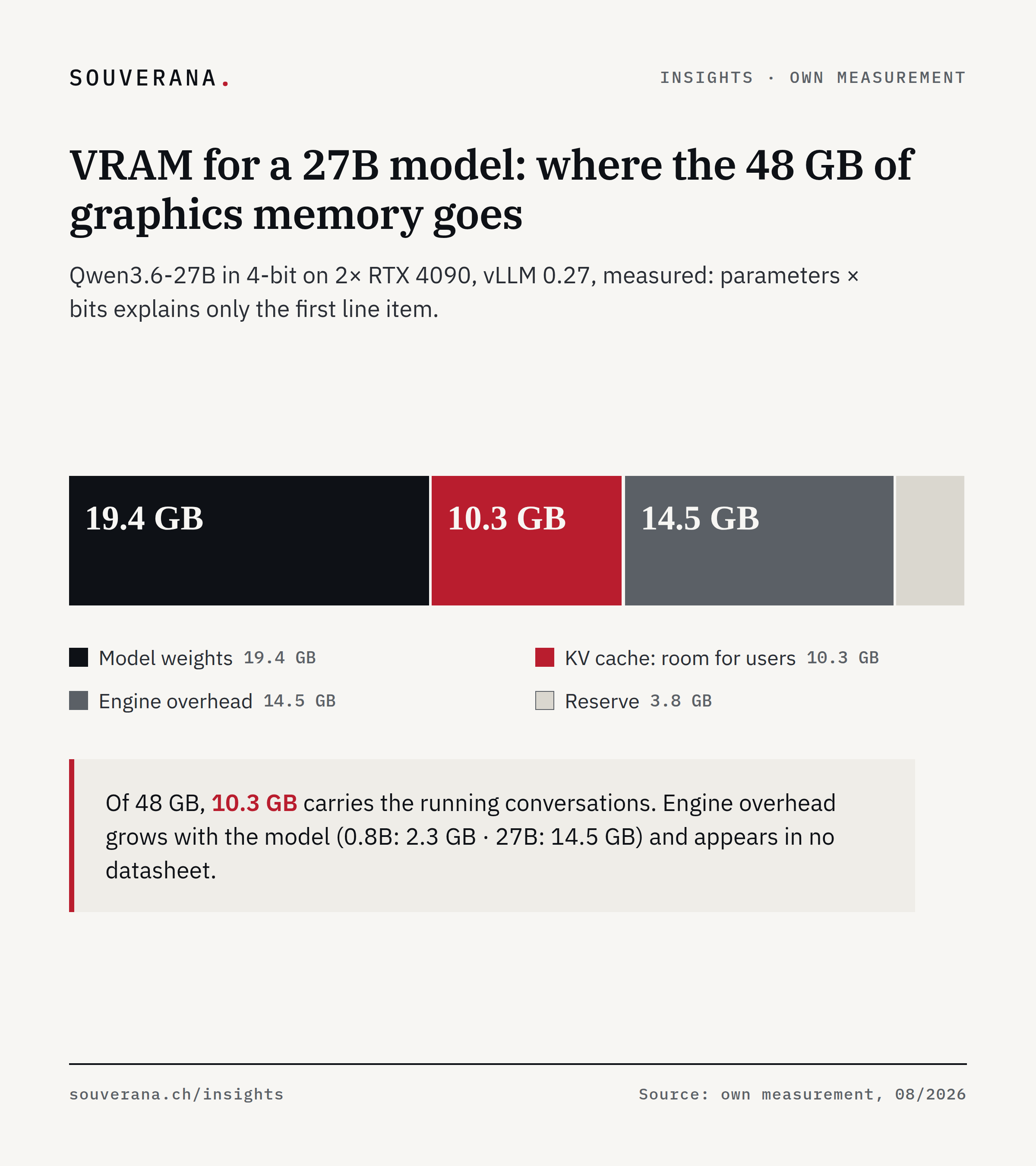
The graphics memory (VRAM) of a machine for local AI has to carry four line items: the model weights, the KV cache (working memory for the running conversations), the overhead of the server software for buffers and compute sequences, and a reserve. For a model with 27 billion parameters at 4-bit precision, the weights come to around 19 GB and the overhead alone to around 15 GB.
In brief
- Factor in the overhead of the server software. That is the memory the software that serves the model (here vLLM) takes up for buffers and compute sequences. It grows with the model. For models of around 30 billion parameters on two cards, it is 13 to 15 GB. What it comes to for you, vLLM writes to the log at every start.
- Context length, meaning the maximum length of a single request, is your biggest lever. Set it generously, and a multi-user machine becomes a single seat.
- Switch the KV cache to FP8, meaning 8 instead of 16 bits per stored value. It is a single setting, and depending on the setup, 37 to 100 percent more conversations fit.
- Check how many layers of a model create a KV cache before comparing models by size. Two similarly sized models can differ by a factor of three per conversation.
- If you offload parts of the model to the computer’s system memory, offload them completely or not at all. Offloading a little costs the most speed per gigabyte saved.
Anyone who orders a machine for local inference commits for three years. If the calculation comes out too small, the server may not even start in the worst case. If it comes out too generous, a few thousand francs of graphics memory sit unused under the desk. The question “does the model fit on the card” sounds like a yes-or-no question, and it is the most expensive point in the whole planning process.
It is usually answered with a multiplication: parameters times bits. That number is a start, but for planning purposes it falls short of the actual requirement.
This is the second part of our series on local inference, meaning AI models on your own hardware. The first part described what our machine is capable of. This part shows how to size a machine of your own.
Why the calculation is harder than it looks
Four quantities determine the requirement, and none of them can be set in isolation:
- the model size, meaning how many parameters get loaded at all
- the quantisation, meaning how many bits per parameter
- the context length, meaning how long a single request is allowed to be
- the concurrent requests, meaning how many conversations run in parallel
The hardware sets the boundary these four have to fit within. Change one, and the others shift. Quadruple the context length, and the number of concurrent users drops to a third. Go from FP8 (8 bits per parameter) to 4-bit, and you gain a third of the space; in our measurement, answer quality stayed unchanged. Add a second card, and you gain users while becoming marginally slower for a single user.
An example with two cards
We loaded a model with 27.8 billion parameters in 4-bit onto two RTX 4090s and then read off how much room was left for users’ conversations. The row “Expected for conversations” is simply the difference between the first two rows. The breakdown looks like this:
| GB | |
|---|---|
| Available on both cards | 48.0 |
| Taken up by the model | 19.4 |
| Expected for conversations | 28.6 |
| Actually available for conversations | 10.3 |
Between the expected 28.6 and the actually available 10.3 GB lie 18.3 GB. vLLM took that before the first conversation even began. So anyone who calculates parameters times bits and plans the rest for their users is planning with memory they will not get.
Where the memory goes
Four line items share the card, and only the first appears in the model name: the weights, the KV cache, the engine overhead, and the reserve.
First, the weights. Their space requirement depends solely on the parameter count and the quantisation. Our runs produced these figures:
| Format | GB per billion parameters |
|---|---|
| 4-bit (AWQ, GGUF Q4) | 0.68 |
| FP8 | 1.02 |
| BF16, unquantised | 2.05 |
For our example: 27.8 billion times 0.68 gives 18.9 GB. The measured figure was 19.4. The formula lands within three percent, close enough for planning.
Second, the KV cache, meaning the room for the running conversations. That it grows with the text length and with every concurrent request was covered in the first part. What is new here is how sharply its space requirement differs between two models.
A model consists of layers stacked on top of one another. Our 27-billion-parameter model has 64 of them, but only every fourth one creates a KV cache. The remaining 48 are recurrent layers: they carry a fixed-size state along and therefore cost nothing extra as the conversation gets longer. For the MoE model in the same family, the ratio comes out even more favourable. MoE stands for Mixture of Experts: the model consists of many small sub-networks, and only a few of them compute per token. The 35B-A3B model has 35 billion parameters, of which around 3 billion compute per token.
| Model | Layers with KV cache | KV per 1,000 tokens |
|---|---|---|
| Qwen3.6-27B | 16 of 64 | 32 MB |
| Qwen3.6-35B-A3B | 10 of 40 | 10 MB |
Two models from the same family differ by a factor of three. Eight users with 10,000 tokens of context each need 2.6 GB for one and 0.8 GB for the other. This difference can decide whether a single card is enough.
Third, the engine overhead. It consists of two parts. The first part is the CUDA graphs, 6.9 GB across both cards in our run. vLLM records a frozen sequence of compute steps for several dozen batch sizes (the number of requests processed at the same time), and for that, the intermediate results of every layer have to sit at fixed addresses. The second part is the buffers for activations (the intermediate results of the layers), the state of the 48 recurrent layers, and the CUDA context, 7.6 GB combined. Both parts make up 14.5 GB taken up before the first conversation begins.
Fourth, the reserve. We started vLLM with --gpu-memory-utilization 0.92,
so it may use 92 percent of the graphics memory, and it leaves the remaining 8
percent (3.8 GB) untouched. You choose this figure
yourself; where its upper limit lies is covered in the pitfalls at the end.
Together, overhead and reserve make up the 18.3 GB from the example above.
The overhead grows with the model. For comparison, we started the smallest model from the previous generation:
| Model | Setup | Engine overhead |
|---|---|---|
| Qwen3.5-0.8B | one card | 2.3 GB |
| Qwen3.6-27B | two cards | 14.5 GB |
| Qwen3.6-35B-A3B | two cards | 13.3 GB |
Room for the intermediate results grows with the model’s width and depth, more slowly than the parameter count: the 27-billion model is five times wider (hidden dimension, meaning the number of values per token in a layer: 5,120 versus 1,024) and almost three times deeper (64 versus 24 layers) than the small one, has 35 times more parameters, but only around eight times more memory for the CUDA graphs (3.4 versus 0.4 GB per card). With two cards, the buffers apply per card. For the model class in this series, budget 13 to 15 GB of overhead in total.
You do not have to guess: vLLM, the engine behind every measurement in this
series, writes the breakdown to the log at every start, in the line Actual usage is ... for peak activation, and ... for CUDAGraph memory. That log is
more reliable than any rule of thumb, ours included.
Work through your own case
The four line items and the measured constants become a calculation you can run for your own hardware.
Two examples to follow along with, which also work without the calculator. Both use the same 27-billion-parameter model in 4-bit.
A single RTX 4090 with 24 GB. Weights 19.4 GB, plus overhead and reserve: the sum is well above 24 GB. With default settings, that does not start. In our measurements, this model ran on a single card only with CUDA graphs disabled and buffers shrunk, and even then room remained for only 15,473 tokens.
Two RTX 4090s with 48 GB combined. Weights 19.4 GB, reserve 3.8 GB, overhead 14.5 GB: 10.3 GB remain for conversations. At 10,000 tokens per request, that is enough for 33 concurrent requests. That the calculation comes out exactly right here is no great feat, since the constants come from this very run. The real test is the MoE model: there, the same calculation predicts 7.8 GB, and the measured token capacity works out to 8.2 GB. The calculation is thus five percent too low, which is the cautious side.
Context length eats concurrent users
“We will take the full context length, then we are equipped for everything” sounds sensible, and it costs the entire multi-user operation.
We took the same machine and the same model and changed only the configured context length. The last column divides the room for conversations by the configured context: that many full-length requests fit in at the same time.
| Configured context | Room for conversations | Concurrent full requests |
|---|---|---|
| 8,192 | 265,784 tokens | 32.4 |
| 32,768 | 398,677 tokens | 12.2 |
| 131,072 | 438,413 tokens | 3.3 |
| 262,144 | 447,637 tokens | 1.7 |
Room for conversations actually grows here, by two thirds. What falls is the number of full requests that fit at the same time: from just over 32 to 1.7, because each individual request is allowed to be 32 times longer. Unlock the full context length, and for the price of a multi-user machine, you get a single seat.
The KV cache can also be run at half precision, in FP8 instead of FP16. On a single card, that exactly doubled capacity, from 3,920 to 7,840 tokens. Across the context sweep on two cards, the gain came out smaller, between a factor of 1.37 and 1.73; one reason is likely the state of the recurrent layers, which does not shrink under the switch, though our logs do not fully explain it. At full context length, FP8 for the KV cache becomes mandatory anyway, since with FP16-KV the server did not start there at all.
One card, two cards
The jump from one card to two looks more dramatic in our measurements than the doubled amount of memory would suggest.
On the setup: both columns ran with identical flags, though with a different context setting than the tables further above. That is why 411,420 tokens appears here and 337,042 in Appendix B for the same model on the same cards. Only what sits in the same row can be compared; the speed figures also come from this run and are therefore lower than those from the first part. Room is given in tokens, because that is the figure the server writes to the log at start.
| One RTX 4090 | Two RTX 4090s | |
|---|---|---|
| Room for conversations | 15,473 tokens | 411,420 tokens |
| Speed for one user | 27.3 tok/s | 23.2 tok/s |
| Speed for four users | 50.0 tok/s | 82.0 tok/s |
| Wait time for four users | 42.0 s | 3.0 s |
A factor of 26.6 in room for conversations, even though the memory only doubles. That is because on a single card, almost nothing is left after weights, overhead and reserve. What remains free is the difference between two large numbers, and a difference like that grows disproportionately once the second card is added.
The row “Speed for one user” is worth noting. For a single user, the second card is slower, because splitting a model across two cards costs data exchange between the cards, and on a consumer motherboard, that runs over a halved connection besides. We checked under load: the cards ran with eight instead of sixteen PCIe lanes (the data lines between card and processor), because two slots share the CPU’s lanes.
When it does not fit: the rule for offloading
If the model does not fit into graphics memory, part of it can be moved into system memory. With every calculation, those parts then have to travel over the connection to the card. How expensive that gets depends solely on the architecture.
For a dense model (a model that uses all of its parameters), throughput collapses. We offloaded 8 GB, and it fell from 168.7 to around 7.4 tokens per second, a factor of 22. The reason is the computation method from the first part: a dense model needs every single parameter for every single token, so every offloaded value travels over the connection for every token.
For an MoE model, it pays off. There, each token calls on only a few experts, and the rarely used ones can stay in system memory:
| Offloaded layers | Graphics memory | Throughput | Wait time |
|---|---|---|---|
| 0 | 23,012 MB | 236.5 tok/s | 1.8 s |
| 8 | 19,472 MB | 96.7 tok/s | 10.4 s |
| 16 | 15,760 MB | 64.1 tok/s | 16.8 s |
| 24 | 12,046 MB | 49.1 tok/s | 23.3 s |
| 48 (all experts) | 4,502 MB | 17.7 tok/s | 47.4 s |
If all experts are offloaded, a model with 35 billion parameters runs in 4.5 GB of graphics memory, which is what an entry-level card offers.
The practically most important row, though, is the one with 8 offloaded layers. The first eight offloaded layers cost 59 percent of throughput and save 3.5 GB. Offload everything, and you lose less speed per gigabyte saved. The table gives the loss in tokens per second per GB saved:
| Offloaded | Cost per GB saved |
|---|---|
| 8 layers | 40.4 tok/s |
| 48 layers | 12.1 tok/s |
From this follows a rule that runs against instinct. If the model fits, offload nothing, because every offloaded layer is pure loss. If it does not fit, offload completely and accept the lower speed. What costs the most is pushing a few layers out quickly so that the model barely fits: around 140 tokens per second for 3.5 GB of memory saved.
Four pitfalls that each cost us a run
Besides the memory calculation, there are settings on which a start can fail.
The display costs a gigabyte. With --gpu-memory-utilization 0.96,
vLLM does not start on a workstation, because the graphical interface
already takes up around a gigabyte. On our machine, 0.94 was the upper
limit.
CUDA graphs can be switched off. --enforce-eager gives back the
roughly 7 GB from the overhead and costs throughput. That is worthwhile on
machines where space is tighter than speed.
FP8 weights need a limit on requests. The official FP8 versions of our model crashed with an error about missing Mamba cache blocks (memory for the state of the recurrent layers), until we capped the number of concurrent sequences at 32. The 4-bit version did not need that.
The FP8 KV cache needs a compiler. If ninja is missing from the
container, the server starts cleanly and answers every request with a
server error, because the matching kernel is only built on the first call.
Anyone who then goes looking in the network will be looking for a long time.
What this means for your purchase
Set up the calculation as a sum: weights plus KV cache plus engine overhead plus reserve. If the sum does not fit on the card, no optimism about the KV cache will help.
Choose the context length based on what your longest real documents need. From 8,192 to 262,144 tokens, the number of concurrent requests falls from 32 to 1.7, and that is the biggest lever in the whole setup.
Take the FP8 KV cache, provided your cards support it. At full context length, the server otherwise does not start at all.
And when space gets tight, a second card helps more than a smaller model: it enables more concurrent users, and that is what a machine like this is usually bought for.
As a checklist before purchase, this gives four steps:
- 01
Set up the calculation as a sum
Weights plus KV cache plus engine overhead plus reserve. The overhead for your model is revealed by the log line at the first start.
- 02
Limit the context length
To what your longest real documents need, plus reserve. Every doubling beyond that costs you concurrent users.
- 03
Log the start attempt
Record how much free KV cache the server starts with. vLLM writes the figure to the log, and it is your real upper limit for concurrent requests.
- 04
Record the configuration
Engine version, memory utilisation, context length, KV precision. Without these four figures, a measurement cannot be reproduced, not even your own.
That settles the memory calculation. How far you can quantise without answers suffering is measured in the third part of the series; the choice of engine and the cost calculation follow after that.
Frequently asked questions
- How much VRAM does a language model need?
- Requirements have four line items: the weights (around 19 GB for a 27-billion-parameter model in 4-bit), the KV cache as conversation memory, the overhead of the server software for buffers and recorded compute sequences (CUDA graphs, around 15 GB for this model), and an adjustable reserve. On two RTX 4090s with 48 GB combined, that left 10 GB for the running conversations.
- What is the KV cache?
- The KV cache (key-value cache) is the working memory in which a model holds the history of a conversation so far. It grows with the text length and with every concurrent request. For long inputs it can take up more space than the model itself. In every case, it limits the number of concurrent users.
- How much graphics memory does 4-bit quantisation save?
- Measured, a model takes up, per billion parameters, 0.68 GB in 4-bit, 1.02 GB in FP8 (8-bit), and 2.05 GB unquantised. Going from unquantised to 4-bit leaves a third of the original requirement, and on a single card that often decides whether the model fits at all.
- Does a second graphics card double what you get?
- For room, it brings far more than double. In our measurement, room for running conversations rose from 15,473 to 411,420 tokens (text fragments), a factor of 26.6, because on a single card almost everything was taken up by weights, overhead and reserve. With a single user, the second card was marginally slower.
- What is the point of offloading parts of the model to system memory?
- For an MoE model (Mixture of Experts, only a few sub-networks compute per token), it pays off: 35 billion parameters ran for us in 4.5 GB of graphics memory, at the price of a factor of 13 in speed. For a dense model (all parameters active), offloading 8 GB costs a factor of 22, because every offloaded parameter travels over the PCIe connection for every token.
Share this article
Ready-formatted graphics and a suggested post for your LinkedIn feed: download, copy, post.
Suggested post
You are planning a machine for local AI. How much graphics memory do you actually need?

The usual answer is: parameters times bits. For a model with 27 billion parameters in 4-bit, that is 19.4 GB, and on two cards with 48 GB combined, that sounds like plenty of room.

Measured with the server software vLLM 0.27, the breakdown looks different: 19.4 GB weights, 14.5 GB software overhead for buffers and compute sequences, 3.8 GB reserve. What remains for all running conversations combined is 10.3 GB. The overhead grows with the model, from 2.3 GB at 0.8 billion parameters to 14.5 GB at 27 billion, and it appears in no datasheet. vLLM writes it to the log at every start.

Our conclusion: anyone who wants to host sovereignly sizes it themselves. Include all four line items, or you buy a machine that holds the model but on which hardly anyone can work.

The article includes a calculator to work through your own case, the effect of context length, and the measurement behind why offloading half to system memory rarely pays off. Link in the comments.

#AI #LLM #Hardware #Switzerland