LLM quantisation: how it works and how to use it well
Quantisation stores a model's numbers with fewer bits, so that a large model fits onto affordable graphics cards and answers faster. The article shows how this works, how to quantise a model yourself and how to find the level at which quality still holds.
Technique · Published 14 Aug 2026 · Updated 1 Oct 2026 · Joel Barmettler
How do I use quantisation correctly?
Quantisation stores the numbers of an AI model with fewer bits. The 4-bit file of the open model Qwen3.6-27B takes up 17.1 GB compared with 29.0 GB at 8 bit. In our measurement with the llama.cpp software in August 2026, that step cost no more than four percentage points on any of the three tasks tested. Below 3 bit, arithmetic collapsed.
In brief
- Quantisation is the most effective lever in operation. For the model Qwen3.6-27B (own measurement, August 2026), the 4-bit file of 17 to 19 GB needs about a third of the 57 GB of a 16-bit version. For a single user, the 4-bit version under vLLM on our two RTX 4090s ran more than twice as fast as the 8-bit version (65.9 against 30.3 tokens per second), and on the same graphics card it serves more users at the same time.
- Start at 4 bit: with Q4_K_M if you use the llama.cpp software, with AWQ for vLLM, a server software for models. The step from 8 to 4 bit cost us almost nothing. The memory saved on the card is available to the KV cache, the temporary store that grows with every concurrent user.
- The file name states only the bit count and says nothing about quality. Our 5-bit file (Q5_K_M) did arithmetic worse than the 4-bit file, and did so with the versions of two independent providers.
- A knowledge test (questions about facts) is never enough for sign-off. Knowledge survives down to 2 bit almost intact; arithmetic collapses well before that. On coding the Q4_K_M file won, on arithmetic the largest file: the same files land at different ranks depending on the task.
- An afternoon is enough for sign-off: around an hour per level for two standard benchmarks against your own server.
Quantisation is the reason local AI works on affordable hardware. In the first part of this series, a model at GPT-5.1 level ran on two consumer graphics cards; in the second, the memory it saved turned into room for concurrent users. Both exist only because of quantisation, and anyone who understands the mechanism can run a larger model on the same hardware.
Understanding it pays off for a second reason too. On Hugging Face, the platform for model files, dozens of ready-quantised files exist for our 27-billion-parameter model, produced by third parties, with names like Q4_K_M or IQ2_XXS. The name states the bits. It does not state what the file can do, and a model quantised too coarsely does not crash, it simply answers wrong more often.
This article therefore shows how quantisation works, worked through once ourselves, and what it costs, measured across seven levels of the same model on three tasks.
What quantisation is
The weights of a language model are billions of decimal numbers, stored at 16 bits per number. Quantisation stores the same numbers more coarsely, at 8, 4 or even fewer bits. A 27-billion-parameter model thus shrinks in memory from 57 to around 19 GB, and only then fits onto affordable cards at all.
Blunt rounding would destroy the model, because 4 bits can only represent 16 distinct values. The trick is to work in small groups: the weights are split into blocks of 32 numbers, each block stores a finely resolved scale of its own, and each number only stores its position on that scale. Because neighbouring weights tend to sit in a similar order of magnitude, this works well, and the loss per number stays small.
How much of that loss actually shows up in the answers is decided elsewhere: by which layers get how many bits. The following example shows this best.
Quantise a model yourself
The whole process takes two commands and needs no GPU. We worked through it for a small model on our own machine:
# 1. Convert the original weights into GGUF format, full precision
docker run --rm -v ~/.cache/huggingface/hub:/hub -v $PWD:/out   ghcr.io/ggml-org/llama.cpp:full   --convert /hub/models--Qwen--Qwen3.5-0.8B/snapshots/<hash>   --outfile /out/f16.gguf --outtype f16

# 2. Quantise to 4 bit
docker run --rm -v $PWD:/out ghcr.io/ggml-org/llama.cpp:full   --quantize /out/f16.gguf /out/q4_k_m.gguf Q4_K_M
The first step took 6 seconds, the second 3.5. 1,475 MB became 506.
More interesting than the result is the log. The tool decides, layer by layer, how coarse each one may become:
token_embd.weight      f16 -> q6_K   485.0 MB -> 198.9 MB
blk.0.attn_qkv.weight  f16 -> q6_K    12.0 MB ->   4.9 MB
blk.0.ffn_gate.weight  f16 -> q4_K     7.0 MB ->   2.0 MB
output_norm.weight     f32  (untouched)
The embedding (the table that translates words into numbers) and the attention (the part that establishes relations between words) get 6 bits, the feed-forward layers (the largest part of the weights) 4 bits, and the normalisation layers stay at full precision. That is why the log also states 5.50 bits per weight for a file called “Q4”: the name states the budget, and the distribution across the layers is decided by the author of the tool. Keep that sentence in mind; it explains a measurement finding further down.
The formats: GGUF, AWQ and the others
Quantised files come in several formats, and the choice follows the engine you host with (the software that runs the model). The “Calibration” column states whether sample data runs through the model during quantisation:
| Format | Calibration | Where it runs |
|---|---|---|
| GGUF Q8_0, Q6_K, Q5_K_M, Q4_K_M | none | llama.cpp, Ollama |
| GGUF IQ levels (IQ2_XXS …) | mostly with calibration data | llama.cpp, below 3 bit |
| AWQ | calibration data | vLLM, SGLang |
| GPTQ | calibration data | vLLM, older standard |
| bitsandbytes (NF4) | none, quantises on load | transformers, fine-tuning |
| FP8 | none, a real number format | vLLM, often direct from the manufacturer |
To read GGUF names: the number states the rough bit budget, the K stands for the mixing technique just shown, and the letter at the end (S, M, L) denotes a variant of it. IQ levels compress below 3 bit and for that rely mostly on an importance matrix built from calibration data.
AWQ and GPTQ go a step further than GGUF: while quantising, they run sample data through the model and specifically protect the weights that matter most for the outputs. bitsandbytes quantises only on load and produces no file at all. It is convenient for experiments and fine-tuning, but less suited to production use. FP8, finally, is a real 8-bit number format that newer cards can compute with directly. Manufacturers such as Qwen officially ship some models this way.
Whether the choice of format affects quality is something we measured as well; the result is further down.
Seven levels, three tasks
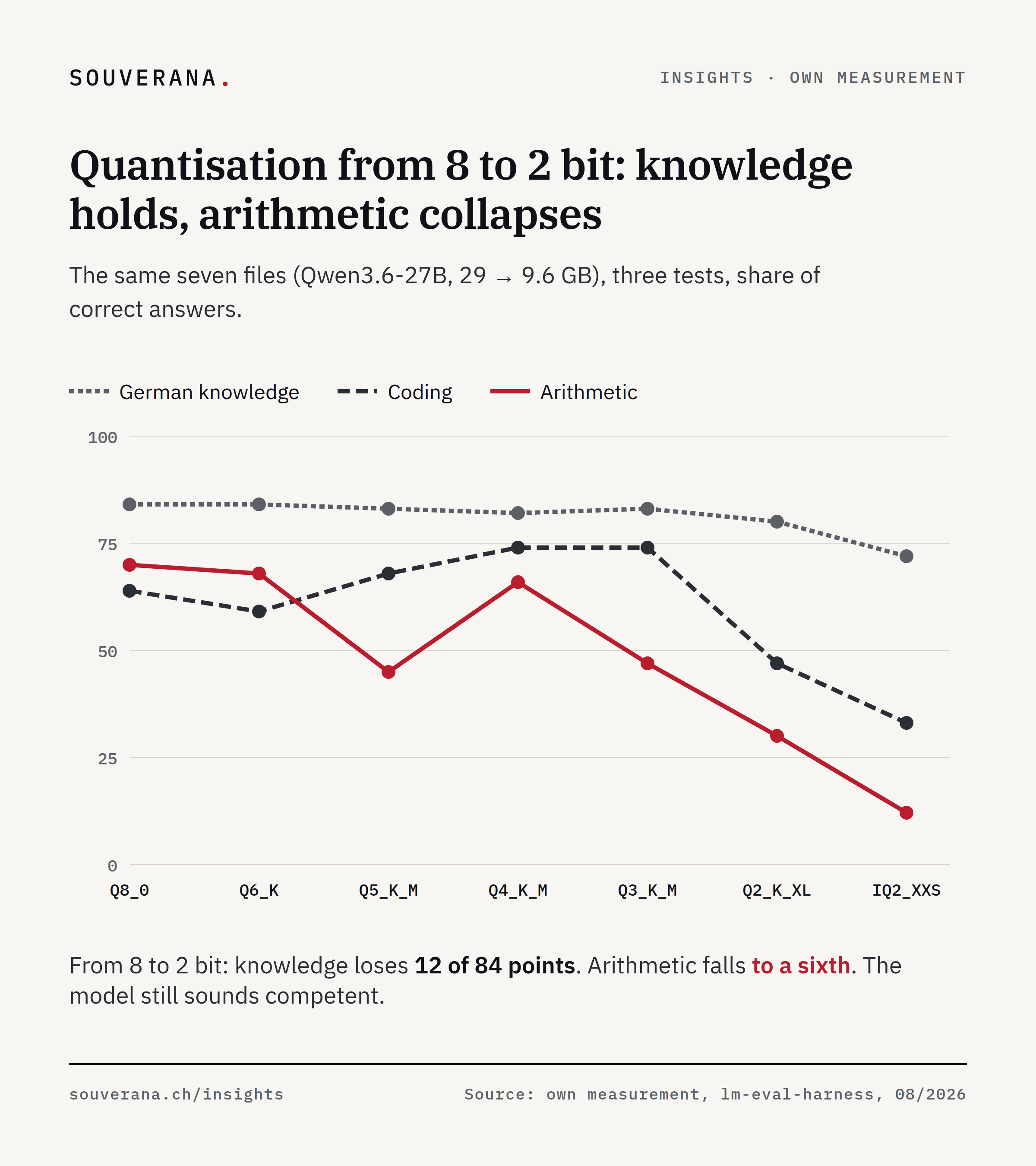
We measured Qwen3.6-27B with llama.cpp on one or two RTX 4090s (the largest levels do not fit on a single card), each level with the same three tests (benchmarks, that is, standardised tests with fixed questions): arithmetic problems in text form (GSM8K), coding tasks with an executable solution (MBPP) and German knowledge questions (Global-MMLU). 200 questions each, 100 for German knowledge; the figure given is the share of correct answers. Differences under around 7 points (German: 10) are not reliable at these sample sizes.
| Level | File | Arithmetic | Coding | German knowledge |
|---|---|---|---|---|
| Q8_0 | 29.0 GB | 70 % | 64 % | 84 % |
| Q6_K | 22.9 GB | 68 % | 59 % | 84 % |
| Q5_K_M | 19.8 GB | 45 % | 68 % | 83 % |
| Q4_K_M | 17.1 GB | 66 % | 74 % | 82 % |
| Q3_K_M | 13.8 GB | 47 % | 74 % | 83 % |
| Q2_K_XL | 12.0 GB | 30 % | 47 % | 80 % |
| IQ2_XXS | 9.6 GB | 12 % | 33 % | 72 % |
The table shows three findings.
From 8 to 4 bit, almost nothing happens. The model loses four points on arithmetic, two on German, and on coding the smaller file even does better. Meanwhile, the file shrinks from 29 to 17 GB. The memory saved on the card is available to the KV cache and so to further concurrent users.
Between 3 and 2 bit, quality collapses. Q3_K_M still codes exactly as well as Q4_K_M and already loses a third on arithmetic. From Q2, all three values fall: IQ2_XXS still solves 12 percent of the arithmetic tasks, so almost none.
And the model keeps running throughout. Why the falling quality goes unnoticed by anyone who only skims the answers is shown in the section “Knowledge survives, arithmetic does not”.
This measurement series comes from a single model. Whether the collapse sits in the same place for other models is something we have not measured. Where it sits for yours, only your own measurement will show.
A larger file can answer worse
The outlier in the table is Q5_K_M: 45 percent on arithmetic, twenty points below the smaller Q4_K_M file. A value like that is normally a measurement error, so we checked: three independent runs of the same file (45, 44, 47 percent), then the same level from a second provider (51 percent). A defective download is therefore ruled out. At two providers, this level does arithmetic worse for this model than the level below it.
We cannot prove the cause. The mechanism from the quantise log above does offer an explanation, though: the name states the bit budget, the distribution across the layers is chosen by the tool. Our model is a hybrid with recurrent layers (they pass a state on from word to word), and the Q5 mix presumably distributes the bits for exactly those layers unfavourably.
Coding and arithmetic rank the same files in opposite order
Read the table once looking only at the arithmetic column, and once looking only at the coding column. On arithmetic, the largest file wins (70 percent); on coding, the Q4_K_M file does (74 percent, the fourth-smallest), and the second-largest file sits there at 59 percent, behind every file down to 3 bit.
Anyone who had only run the arithmetic test would have chosen Q8_0 and scored ten points less on coding than with the best file. Anyone who had only run the coding test would have chosen Q3_K_M and lost a third on arithmetic.
That is why no single benchmark serves as a sign-off. You need two to three, and they must match your own task: anyone generating code measures code. Anyone who has German subject-matter questions answered measures German subject-matter questions.
Knowledge survives, arithmetic does not
The German column behaves differently from the other two across all seven levels. That is the most important finding of the measurement series:
| Q8_0 | IQ2_XXS | Loss | |
|---|---|---|---|
| Arithmetic | 70 % | 12 % | to a sixth |
| Coding | 64 % | 33 % | almost halved |
| German knowledge | 84 % | 72 % | 12 points (14 percent) |
From 8 to 2 bit, the model loses almost all of its arithmetic ability and keeps almost all of its knowledge. An over-quantised model still knows what the revFADP is, still writes cleanly, and can no longer chain three reasoning steps together correctly.
For sign-off, that means: a knowledge test clears a model that can no longer calculate reliably. Anyone checking whether a quantisation is fit for purpose has to have the model solve arithmetic or multi-step tasks, because that is where quality breaks down first.
”Native” is not a promise of quality
Alongside community files, some manufacturers offer their own quantised versions. Qwen ships the 27-billion-parameter model officially in FP8, meaning 8 bits per parameter, produced by the manufacturer itself. That sounds like the safe choice next to a 4-bit file from the community.
In our measurement, the community version is better on memory and speed and level on arithmetic:
| AWQ (community, 4-bit) | FP8 (manufacturer, 8-bit) | |
|---|---|---|
| Memory per card | 9.7 GB | 14.5 GB |
| Speed at one user | 65.9 tok/s | 30.3 tok/s |
| Arithmetic | 65 % | 62 % |
The FP8 version has twice the bits, reaches only half the speed (tok/s stands for tokens per second) and needs one and a half times the memory. The quality difference sits within the measurement error. We did not isolate why the 4-bit version is so much faster. Presumably the engine’s 4-bit kernels (the computing routines for the graphics card) run particularly fast on our RTX 4090s. On a different card generation, the same choice can turn out differently.
The comparison also serves as a cross-check for the measurement series: AWQ under vLLM (65 percent) and Q4_K_M under llama.cpp (66 percent) are two different 4-bit methods on two different engines and land at the same value. The measurement is therefore stable, and the Q5 outlier stands out all the more.
The same caution applies when buying compute: hosts often run a silently quantised version under a model’s name. What that means for price comparisons is covered in the article on LLM costs.
How to measure it yourself
Ready-made benchmarks are enough as long as they match the task. For running them, the lm-evaluation-harness from EleutherAI is suitable, a tool that runs benchmarks against OpenAI-compatible servers, including your own. With two tests of 200 questions each, one level costs around an hour, and the whole sign-off across three levels costs an afternoon. Proceed as follows:
- 01
Choose two to three benchmarks that match the task
MBPP or HumanEval for code, GSM8K for arithmetic and multi-step work, Global-MMLU for German subject knowledge. At least one of them must test multi-step reasoning.
- 02
Run with 200 questions per test
That bounds the standard error to around 3.5 points: good enough for a 20-point outlier like ours, too coarse for fine comparisons. For choosing between two levels, it is enough.
- 03
Measure the candidate levels with the same settings
Q4_K_M as the starting point, plus the level above and below it. Change only the file between runs, otherwise a difference can no longer be attributed.
- 04
Remeasure at every change
New model version, new provider of the quantisation, new engine version: run the same pass again. The Q5 case shows that this cannot be predicted in advance.
Two traps cost us a failed run each along the way, both producing wrong numbers with no error message. Coding benchmarks execute the generated code and need two explicit approvals for that; if one is missing, the test appears to run through and delivers an empty table. And a reasoning model (it thinks in an intermediate text before answering) silently spends its answer budget in that thinking part. If reasoning stays switched on, the result comes out at exactly 0.0. That looks like a broken model but is a misconfigured measurement setup. The commands that avoid both traps are in the appendix of the PDF version.
With quantisation, the model is chosen and tested. The fourth part of the series covers which software delivers it, and the fifth works out what the whole setup costs.
Frequently asked questions
- Which quantisation should I choose for a local LLM?
- Start with 4 bit: Q4_K_M for the llama.cpp software, AWQ for the vLLM server software. In our measurement, the step from 8 to 4 bit cost no more than four percentage points on any of the three tasks tested, while saving 41 percent of the memory. Below 3 bit, arithmetic ability collapsed.
- Does a model lose quality through quantisation?
- How much depends on the task. Between 8 and 4 bit, our measurement showed only a few percentage points, and on one task the smaller file was even better. From 2 bit, arithmetic ability fell to a sixth, while German subject knowledge lost 14 percent. The model still sounds competent and still gets the calculation wrong.
- What does Q4_K_M mean?
- A quantisation level in the GGUF file format, which the llama.cpp software reads: around 4 bits per parameter, with the K methods storing important layers more precisely than unimportant ones. The letters after it (S, M, L) denote variants of that mix. How well that mix suits your task is not shown by the file name.
- Is AWQ better than GGUF?
- AWQ and GGUF are two formats for quantised models. At the same bit count, both came out level in our measurement: AWQ under vLLM reached 65 percent on the arithmetic test, Q4_K_M under llama.cpp 66. The choice depends on the engine, that is, the software that runs the model: GGUF belongs to llama.cpp and Ollama, AWQ to vLLM.
- How do I check whether a quantisation is good enough for my task?
- With two to three standard benchmarks matching your task, executed with the lm-evaluation-harness testing tool against your own server. At 200 questions per test, that takes about an hour per level. What matters is a test that checks arithmetic or multi-step work, because that is exactly what breaks first.
Share this article
Ready-formatted graphics and a suggested post for your LinkedIn feed: download, copy, post.
Suggested post
Want to fit a larger model onto your graphics card? The route there runs through quantisation.

Quantisation stores a model's numbers with fewer bits. That is why a model shrinks from 29 GB at 8 bit to 9.6 GB at 2 bit and runs on hardware that can sit on your own premises. The question is what gets lost along the way.

We measured the same model across seven levels, with three tests (lm-eval-harness). From 8 to 2 bit, German subject knowledge loses 12 of 84 points, arithmetic falls to a sixth. And the file name alone is not enough: our 5-bit file did arithmetic worse than the 4-bit file, at two independent providers.

Our conclusion: an over-quantised model keeps sounding competent, because knowledge is retained longest. It simply stops calculating reliably. So measure the level you have chosen against your own task; an hour per level is enough.

The article carries the full measurement series, the difference between GGUF, AWQ and FP8, and a guide to quantising a model yourself. Link in the comments.

#AI #LLM #Quantisation #Switzerland